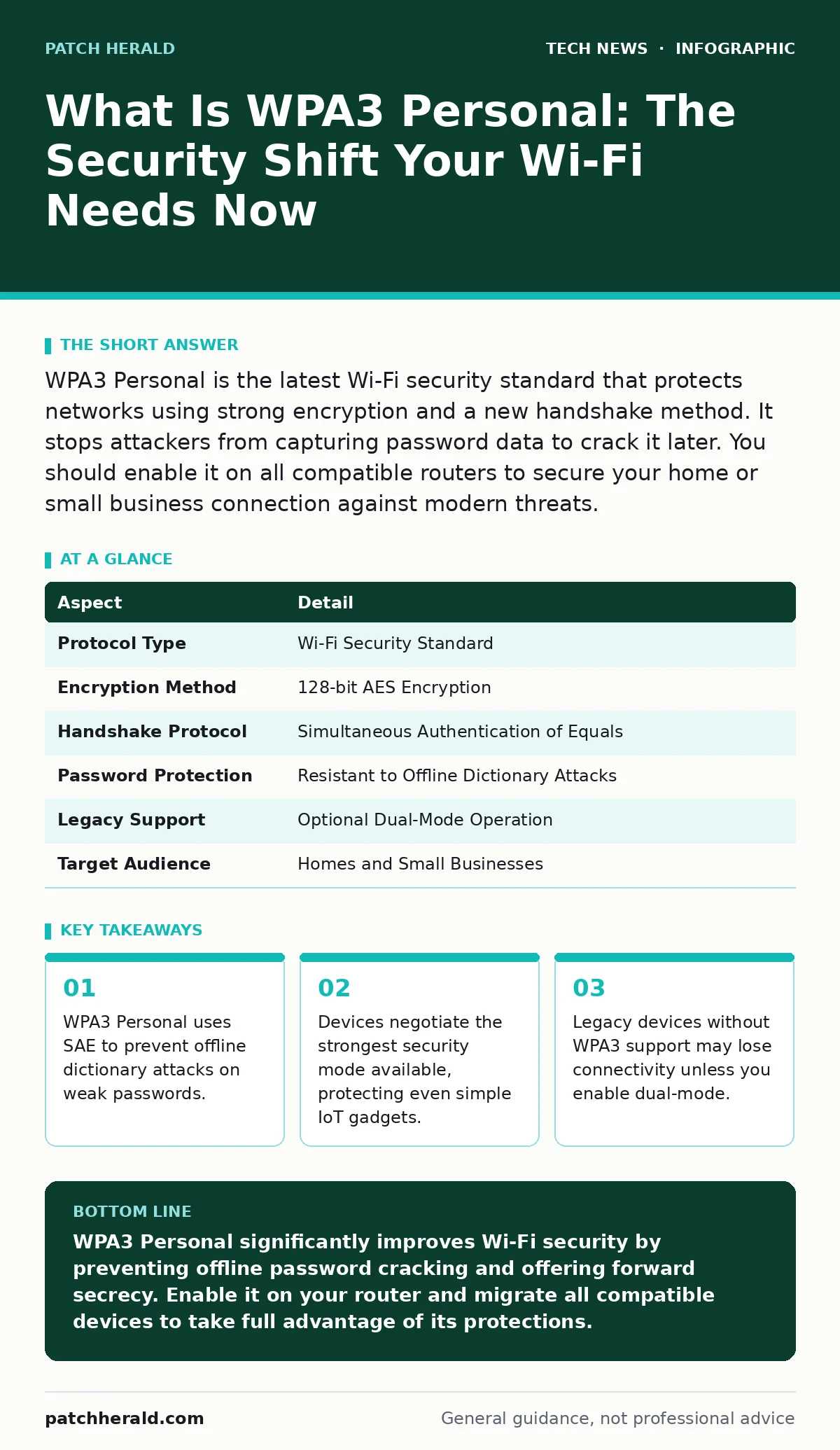
WPA3 Personal is the latest Wi-Fi security standard that protects networks using strong encryption and a new handshake method. It stops attackers from capturing password data to crack it later. You should enable it on all compatible routers to secure your home or small business connection against modern threats.
Understanding the Core Mechanism
Imagine you are sending a sealed letter to a friend. In the past, you might have used a simple padlock that anyone could pick if they watched you lock it enough times. WPA3 Personal changes the lock. It ensures that even if an attacker watches the entire exchange, they cannot reverse-engineer the key to open future letters.
WPA3 Personal is a Wi-Fi security protocol that replaces the older WPA2 standard for home and small business networks. It introduces a new handshake process called Simultaneous Authentication of Equals. This mechanism ensures that both the device and the router prove they know the password without ever transmitting the password itself.
The primary goal is to stop offline dictionary attacks. In previous standards, an attacker could capture the handshake data and try millions of password combinations on their own computer. WPA3 makes this capture useless for guessing the password. Each login attempt requires interaction with the legitimate device, slowing down brute-force efforts significantly.
| Aspect | Detail |
|---|---|
| Protocol Type | Wi-Fi Security Standard |
| Encryption Method | 128-bit AES Encryption |
| Handshake Protocol | Simultaneous Authentication of Equals |
| Password Protection | Resistant to Offline Dictionary Attacks |
| Legacy Support | Optional Dual-Mode Operation |
| Target Audience | Homes and Small Businesses |
How WPA3 Personal Works in Practice
The security improvement comes from how the router and device agree on a session key. Instead of a simple challenge-response, they perform a complex mathematical dance. This dance ensures that no useful information is leaked during the connection process.
An attacker listening to the traffic sees encrypted data but cannot derive the password. Even if the password is "123456," the handshake prevents the attacker from testing that guess quickly. The device must respond to each challenge in real-time. This forces any attack to be online and detectable.
This process also provides forward secrecy. If an attacker somehow records your traffic today and steals your password next year, they cannot decrypt the recorded traffic. The session keys are unique to each connection. This limits the damage of a compromised password to only future connections.
Who This Standard Affects Most
WPA3 Personal affects anyone who uses wireless networks in a home or small office. It is particularly relevant for users who rely on simple passwords. Many people choose short or common passwords for convenience. WPA3 reduces the risk associated with these poor choices.
Small business owners benefit from the ease of deployment. You do not need complex certificate management to get strong security. The standard handles the heavy lifting of encryption and authentication automatically. This reduces the administrative burden on IT staff who may not be security experts.
Internet of Things devices are also impacted. Many smart home gadgets have weak security built-in. WPA3 ensures that even these devices use strong encryption when connecting to the network. This protects the broader network from compromised smart bulbs or cameras.
What You Should Do About It
Check your router specifications to see if it supports WPA3 Personal. Most routers manufactured in the last few years include this capability. If your router is older, it may not support the protocol. You cannot enable WPA3 on hardware that lacks the necessary firmware and chipset support.
If your router supports WPA3, enable it in the settings menu. Look for the security type option and select WPA3-Personal. Some routers offer a mixed mode that allows both WPA2 and WPA3 devices to connect. This is useful during a transition period but reduces overall security.
You should also check your devices for compatibility. Older laptops or smartphones may not support WPA3. If a device cannot connect, you may need to update its operating system. See guides on operating system hardening to ensure your devices are ready for modern security standards.
Common Misconceptions About WPA3
Many people believe that WPA3 makes weak passwords safe. This is incorrect. WPA3 makes it harder to crack passwords, but it does not eliminate the risk. A simple password can still be guessed if the attacker has direct access to the login process. You should still use long, complex passwords.
Another mistake is assuming WPA3 protects against all threats. It secures the wireless link between your device and the router. It does not protect against malware on your computer or phishing attacks. You must still practice good security hygiene on all connected devices.
Some users think WPA3 is only for enterprise environments. This is false. WPA3 Personal is designed specifically for homes and small businesses. It is easier to set up than the enterprise version, which requires certificate authorities for authentication.
See also: Difference Between Public Key and Private Key Encryption Explained · Load Balancers Types: How Traffic Distribution Protects Your Systems
The Trade-Offs of Adoption
Adopting WPA3 Personal comes with a compatibility trade-off. Older devices may not connect to a WPA3-only network. This can be frustrating if you have legacy smart home devices or older laptops. You must decide whether to replace these devices or use mixed mode.
Mixed mode reduces the security benefit. If one device connects via WPA2, the entire network is not protected by WPA3's stronger handshake. You should aim to migrate all devices to WPA3 as soon as possible. Check for firmware updates for your IoT devices to see if they support WPA3.
The transition may require some effort. You may need to reconfigure your network settings. You may also need to update drivers on your computers. This is a one-time cost for long-term security benefits. The effort is worth it for the protection against modern attacks.
Integrating With Other Security Measures
WPA3 Personal works best when combined with other security practices. It is not a standalone solution. You should also use network access control to limit which devices can connect to your network. This adds another layer of defense against unauthorized access.
Consider how your devices communicate with each other. Virtualization security is important if you run virtual machines on your network. These machines may have different security requirements. Ensure that your virtualization platform is secure and up to date.
Do not forget about software updates. Operating system kernels are updated regularly to fix security vulnerabilities. Keep your devices updated to ensure they work correctly with WPA3. This also protects against other types of attacks that WPA3 does not address.
Final Steps for Implementation
Start by identifying all devices on your network. Check their compatibility with WPA3 Personal. Update any devices that have pending firmware or software updates. This ensures they can handle the new security protocol correctly.
Enable WPA3 on your router. If you have mixed devices, start with mixed mode and plan to migrate. Monitor your network for any connection issues. Address these issues by updating or replacing incompatible devices.
Regularly review your network security settings. Ensure that your password is strong and unique. Consider using a password manager to generate and store complex passwords. This complements the technical security of WPA3 with good administrative practices.
Key takeaways
- WPA3 Personal uses SAE to prevent offline dictionary attacks on weak passwords.
- Devices negotiate the strongest security mode available, protecting even simple IoT gadgets.
- Legacy devices without WPA3 support may lose connectivity unless you enable dual-mode.
WPA3 Personal significantly improves Wi-Fi security by preventing offline password cracking and offering forward secrecy. Enable it on your router and migrate all compatible devices to take full advantage of its protections.
Frequently asked questions
Can I use WPA3 on my old router?
No, WPA3 requires hardware and firmware support that older routers do not have. You must upgrade your router to use WPA3 Personal.
Does WPA3 work with all my devices?
Not necessarily. Older devices may not support WPA3. You may need to use mixed mode or update your devices to ensure compatibility.
Is WPA3 better than WPA2?
Yes, WPA3 provides stronger encryption and protection against offline dictionary attacks. It is the recommended standard for new installations.
Do I need a strong password with WPA3?
Yes, while WPA3 makes weak passwords harder to crack, strong passwords are still necessary for comprehensive security.
How this guide was produced: written by the Patch Herald editorial team with AI assistance, checked against the public references listed below, and reviewed when the facts change. See our editorial policy or report an error.