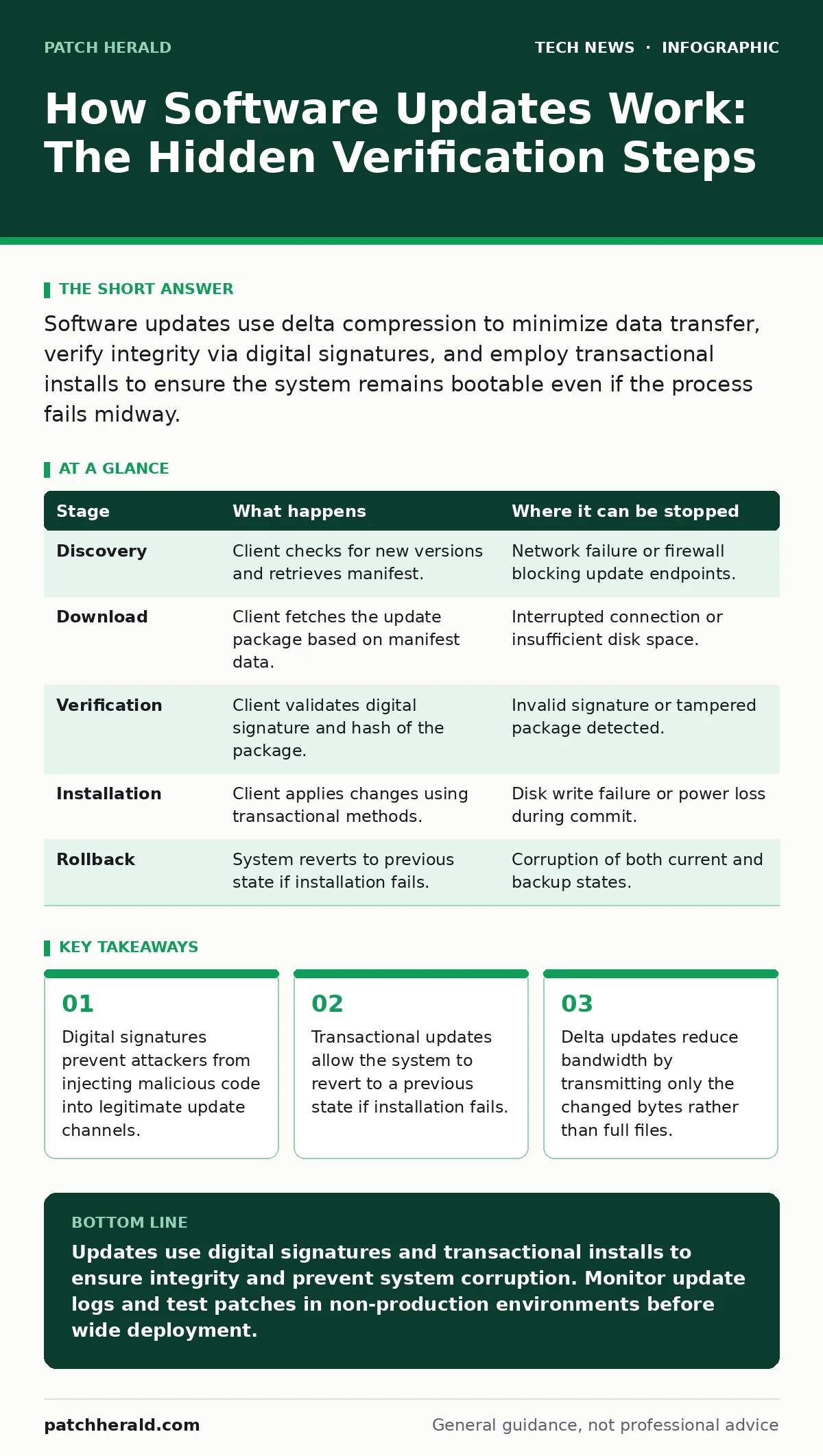
Software updates use delta compression to minimize data transfer, verify integrity via digital signatures, and employ transactional installs to ensure the system remains bootable even if the process fails midway.
The Delta Calculation Process
When an update is released, the provider rarely sends the entire application again. Instead, they calculate the differences between the old version and the new one. This process, known as delta compression, identifies which specific bytes have changed. The result is a smaller patch file that contains instructions on how to transform the existing code into the new version.
This approach saves significant bandwidth for you and reduces server load for the provider. However, it introduces complexity. The update client on your device must have the original file to apply the changes correctly. If the original file is missing or corrupted, the delta application will fail. This is why update systems often perform a pre-installation check to verify the integrity of the current state before downloading anything.
Stage 1: Discovery and Manifest Verification
The update client contacts the update server to check for new versions. It does not download the update immediately. First, it retrieves a manifest file. This manifest lists the available updates, their sizes, and their cryptographic hashes. A cryptographic hash is a unique string of characters generated from the content of a file. Any change to the file, even a single bit, results in a completely different hash.
The client compares the hash in the manifest with the hash of the update package it intends to download. If they do not match, the download is aborted. This step ensures that the file you receive is exactly what the provider intended to send. It prevents accidental corruption during transmission. It also serves as the first line of defense against man-in-the-middle attacks, where an interceptor alters the data in transit.
| Stage | What happens | Where it can be stopped |
|---|---|---|
| Discovery | Client checks for new versions and retrieves manifest. | Network failure or firewall blocking update endpoints. |
| Download | Client fetches the update package based on manifest data. | Interrupted connection or insufficient disk space. |
| Verification | Client validates digital signature and hash of the package. | Invalid signature or tampered package detected. |
| Installation | Client applies changes using transactional methods. | Disk write failure or power loss during commit. |
| Rollback | System reverts to previous state if installation fails. | Corruption of both current and backup states. |
The Integrity Verification Layer
Before the update is applied, the system verifies its authenticity. This is not just a hash check. The update package is signed with a private key held by the software vendor. Your device holds the corresponding public key. The update client uses this public key to verify the signature. This confirms that the update came from the legitimate source and has not been altered since it was signed.
This mechanism is critical for security. Without it, an attacker who compromises the update server could distribute malware to millions of devices. The signature verification ensures that even if the server is compromised, the attacker cannot sign a malicious update without the private key. This ties into broader security practices like Certificate Transparency, which logs certificate issuance to detect unauthorized certificates. While updates rely on code signing, the underlying trust model is similar.
Transactional Installation Mechanics
The most complex part of an update is the installation itself. Simply replacing files one by one is risky. If the power fails halfway through, your system may be left in a broken state. To prevent this, modern systems use transactional updates. A transaction is a unit of work that must complete entirely or not at all.
The system writes the new files to a separate partition or a shadow space. It does not overwrite the active files immediately. Once all new files are written and verified, the system switches the boot pointer to the new partition. This switch is atomic, meaning it happens instantly. If the write process fails, the system simply ignores the incomplete partition and boots the old, working version. This ensures that a failed update does not brick your device.
Stage 2: Payload Extraction and Staging
The update client extracts the compressed files from the package. It places these files in a staging area, which is a temporary location on the disk. This area is isolated from the active operating system. The client verifies the integrity of each extracted file. If any file is corrupted, the entire transaction is aborted. This prevents partial installations that could cause conflicts.
This staging process also allows the system to check for dependencies. Some updates require other libraries or components to be present. If a dependency is missing, the update may fail or trigger a chain of additional updates. This is why some updates take longer than expected. The system is resolving a complex web of dependencies to ensure everything works together.
The Limits of Automated Updates
Automated updates are convenient, but they are not infallible. They rely on the assumption that the update server is trustworthy and the network is secure. If an attacker compromises the update channel, they can distribute malicious updates. This is why open-source software security relies heavily on community scrutiny. In closed ecosystems, you must trust the vendor’s internal security practices.
Another limit is the speed of response. Vendors may take days or weeks to release patches for critical vulnerabilities. During this window, your systems are exposed. Automated updates cannot protect you from zero-day exploits until a patch is available and deployed. You must combine updates with other security measures, such as network access control, to limit the damage if a vulnerability is exploited before a patch is applied.
Managing Update Failures
When an update fails, the system should revert to its previous state. This rollback process is automatic in most modern systems. However, it is not always perfect. If the rollback mechanism itself is corrupted, the system may fail to boot. This is a rare but serious scenario. It highlights the importance of regular backups. Backups provide a safety net that goes beyond the update system’s own rollback capabilities.
You should also monitor update logs. These logs record every step of the update process, from discovery to installation. They can help you diagnose why an update failed. If you see repeated failures, it may indicate a deeper issue with your system, such as disk errors or malware interference. Ignoring these failures can leave your system vulnerable.
Stage 3: Post-Installation Verification
After the update is applied, the system performs post-installation checks. It verifies that all services are running correctly. It checks for errors in the logs. If any issues are detected, the system may trigger a rollback. This final verification ensures that the update did not introduce new problems. It is the last line of defense against a bad update.
This stage also updates the system’s metadata. It records the new version number and the date of installation. This information is used for future updates and for auditing purposes. It helps you track the security posture of your systems over time. Regular auditing is a key part of remote work security, ensuring that all devices meet the required standards.
See also: Difference Between Public Key and Private Key Encryption Explained · Load Balancers Types: How Traffic Distribution Protects Your Systems
The Human Element in Updates
Despite automation, human oversight is necessary. You must decide which updates to prioritize. Not all updates are equal. Security patches are critical, while feature updates may be optional. You must also manage the timing of updates. Installing updates during peak business hours can disrupt productivity. Scheduling updates during off-hours minimizes this impact.
You should also review update policies regularly. As your business grows, your update strategy may need to change. What worked for a small team may not work for a large organization. You must balance security with stability. This requires a nuanced understanding of your systems and their dependencies. It is not enough to just click "install." You must understand what the update does and why it is necessary.
Conclusion of the Update Cycle
The update cycle is continuous. New vulnerabilities are discovered regularly, and vendors release patches to address them. Your role is to ensure that these patches are applied promptly and correctly. This requires a combination of automation and manual oversight. Automation handles the routine tasks, while manual oversight addresses exceptions and complex scenarios.
By understanding how updates work, you can make better decisions about your security posture. You can identify potential risks and take steps to mitigate them. You can also communicate more effectively with your IT team or vendor about update issues. Knowledge is power in cybersecurity. The more you understand about the mechanisms behind the scenes, the better equipped you are to protect your systems.
Key takeaways
- Digital signatures prevent attackers from injecting malicious code into legitimate update channels.
- Transactional updates allow the system to revert to a previous state if installation fails.
- Delta updates reduce bandwidth by transmitting only the changed bytes rather than full files.
Updates use digital signatures and transactional installs to ensure integrity and prevent system corruption. Monitor update logs and test patches in non-production environments before wide deployment.
Frequently asked questions
Why do some updates require a system reboot?
Reboots are required when the update modifies core system files or drivers that are locked by the operating system while it is running. The reboot allows the system to load the new files from scratch.
Can an update be malicious?
Yes, if the update channel is compromised. This is why digital signatures are critical. They verify that the update comes from the legitimate vendor. Always ensure your system validates these signatures.
How often should I check for updates?
Enable automatic updates for critical security patches. For non-critical updates, check weekly or monthly. This balances security with stability and minimizes disruption to your workflow.
What happens if an update fails?
Most modern systems will automatically roll back to the previous version. If this fails, you may need to manually restore from a backup. Regular backups are essential for recovery.
How this guide was produced: written by the Patch Herald editorial team with AI assistance, checked against the public references listed below, and reviewed when the facts change. See our editorial policy or report an error.