Watch for unexplained latency, failed admin logins, and new outbound connections. These signs often precede data exfiltration. Isolate the device immediately, switch to manual routing, and audit all configuration changes before restoring normal operations.
Early Indicators of Compromise
Network performance degradation is often the first noticeable sign of a vulnerable VPN appliance. You may experience increased latency or packet loss on connections that previously worked smoothly. This slowdown frequently results from the appliance encrypting and decrypting traffic for an attacker’s exfiltration tunnel. The device struggles to process the additional, unauthorized payload alongside legitimate user traffic.
Authentication anomalies provide another early warning. Notice if legitimate users report intermittent login failures while the admin console shows successful authentications from unexpected IP addresses. This discrepancy suggests an attacker has obtained credentials or bypassed authentication mechanisms. The system accepts the attacker’s sessions while rejecting legitimate ones due to session table exhaustion.
Subtle Signs That Are Easy to Miss
Configuration drift is a silent but dangerous indicator. You might find new routes, firewall rules, or user accounts that you did not create. These changes often occur slowly, making them hard to spot during casual reviews. Attackers add these elements to maintain persistence and facilitate data theft. Regular baseline comparisons are necessary to detect these subtle modifications.
Outbound traffic patterns reveal hidden compromises. A VPN appliance should primarily handle inbound and outbound traffic for connected clients. If the device itself initiates connections to unknown external IP addresses, it is likely communicating with a command-and-control server. This behavior is distinct from client traffic and indicates the appliance itself is compromised.
Immediate Response Procedures
Isolate the compromised appliance immediately upon detecting these signs. Do not simply power it off, as this destroys volatile memory evidence. Instead, disconnect the external network interface while keeping the management port active. This action prevents further data exfiltration and lateral movement within your network. You can still access the device to gather forensic data from the isolated segment.
Switch to a backup connectivity method to maintain business operations. Use a secondary internet connection or a temporary hardware bypass if available. This ensures your teams can continue working while you investigate the breach. Do not attempt to clean the appliance while it is still connected to the production network.
Forensic Data Collection
Capture the current state of the appliance before making changes. Export the configuration file, logs, and running process lists. These artifacts provide evidence of what the attacker did and how they entered. Store these files on a secure, offline storage device. Do not save them to the compromised network or cloud services accessible from the affected appliance.
Analyze the logs for specific indicators. Look for repeated failed login attempts followed by a success, unusual outbound connections, and configuration changes made outside of maintenance windows. Correlate these events with the time of the first performance degradation. This timeline helps you understand the scope of the breach and the attacker’s objectives.
Remediation and Restoration
Replace the compromised appliance rather than attempting to patch it. A compromised device may contain hidden backdoors that are difficult to detect. Purchasing a new unit and configuring it from scratch ensures a clean state. If replacement is not immediately possible, reinstall the firmware from a known-good source and change all credentials.
Implement stricter access controls on the new device. Disable default accounts, enforce multi-factor authentication, and restrict management access to specific IP ranges. Regularly update the firmware to address known vulnerabilities. Consider implementing network segmentation to limit the damage if the appliance is compromised again.
See also: Stop FortiGate Exploits: Prioritized Prevention Measures That Actually Work
Preventing Future Incidents
Regular configuration audits prevent drift from going unnoticed. Compare the current configuration against a known-good baseline weekly. Automate this process if possible to ensure consistency. This practice helps you detect unauthorized changes quickly, reducing the window of opportunity for attackers.
Monitor outbound traffic from the appliance continuously. Alert on any connection initiated by the device itself to external IPs. This monitoring helps you catch command-and-control communications early. Combine this with intrusion detection systems that analyze traffic patterns for anomalies.
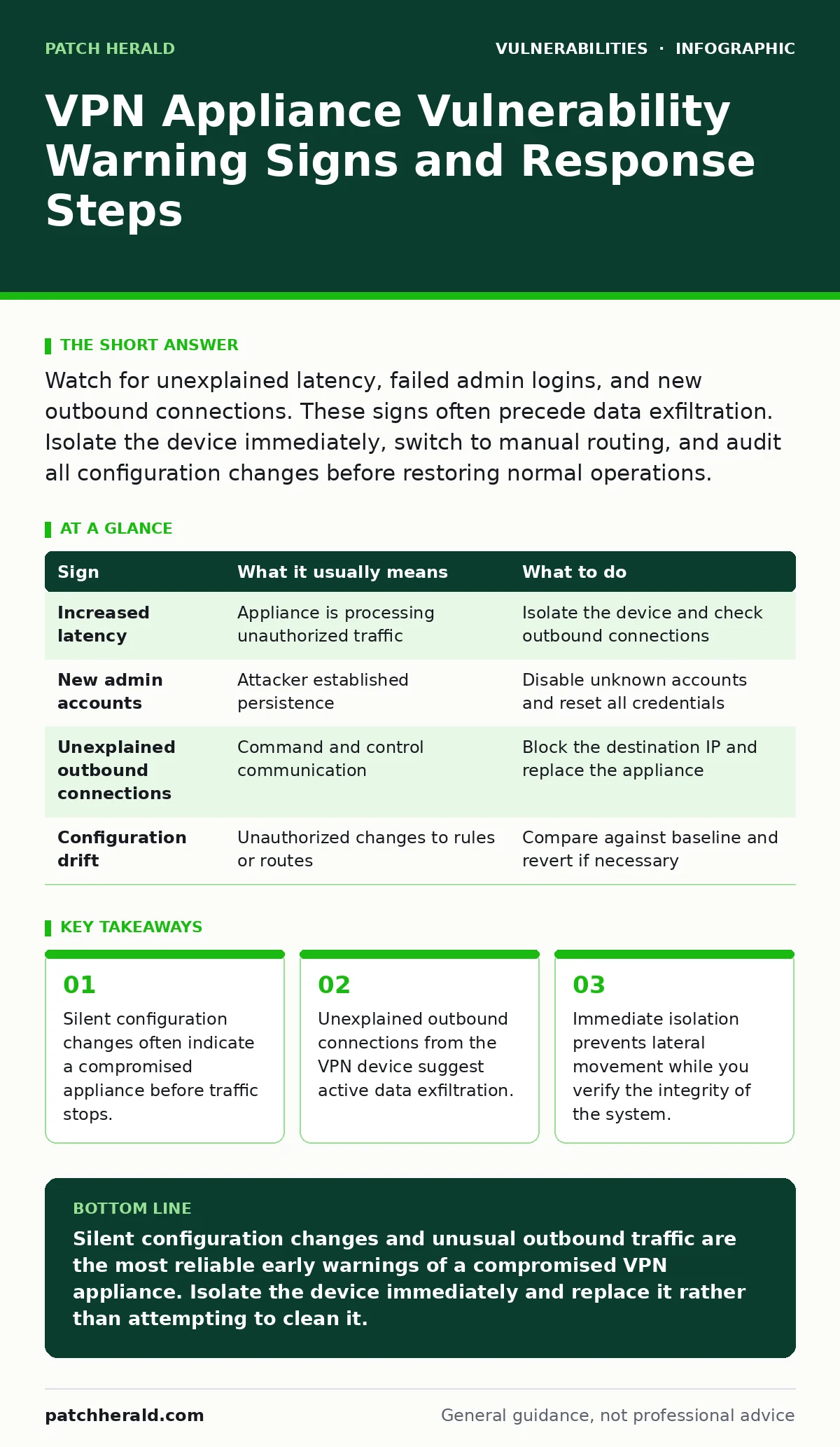
| Sign | What it usually means | What to do |
|---|---|---|
| Increased latency | Appliance is processing unauthorized traffic | Isolate the device and check outbound connections |
| New admin accounts | Attacker established persistence | Disable unknown accounts and reset all credentials |
| Unexplained outbound connections | Command and control communication | Block the destination IP and replace the appliance |
| Configuration drift | Unauthorized changes to rules or routes | Compare against baseline and revert if necessary |
Related Security Concerns
While focusing on VPN appliances, remain aware of other entry points. Exposed admin panels on other network devices can provide attackers with the initial access needed to reach the VPN. Similarly, dependency confusion attacks can infiltrate your supply chain, potentially affecting the firmware updates you apply to these devices.
Understanding server-side template injection helps you secure any web interfaces associated with your network equipment. While not directly a VPN issue, vulnerable management interfaces often share the same network segment. Protecting one reduces the attack surface for the other.
Key takeaways
- Silent configuration changes often indicate a compromised appliance before traffic stops.
- Unexplained outbound connections from the VPN device suggest active data exfiltration.
- Immediate isolation prevents lateral movement while you verify the integrity of the system.
Silent configuration changes and unusual outbound traffic are the most reliable early warnings of a compromised VPN appliance. Isolate the device immediately and replace it rather than attempting to clean it.
Frequently asked questions
How often should I check VPN appliance configurations?
Perform a manual comparison against a known baseline weekly. Automate this check if possible to detect changes in real-time.
Can I patch a compromised VPN appliance?
Patching does not remove hidden backdoors. Replace the appliance or perform a full firmware reinstall and credential reset.
What is the first step when suspecting a breach?
Isolate the appliance from the external network to stop data exfiltration while keeping management access for forensics.
How this guide was produced: written by the Patch Herald editorial team with AI assistance, checked against the public references listed below, and reviewed when the facts change. See our editorial policy or report an error.