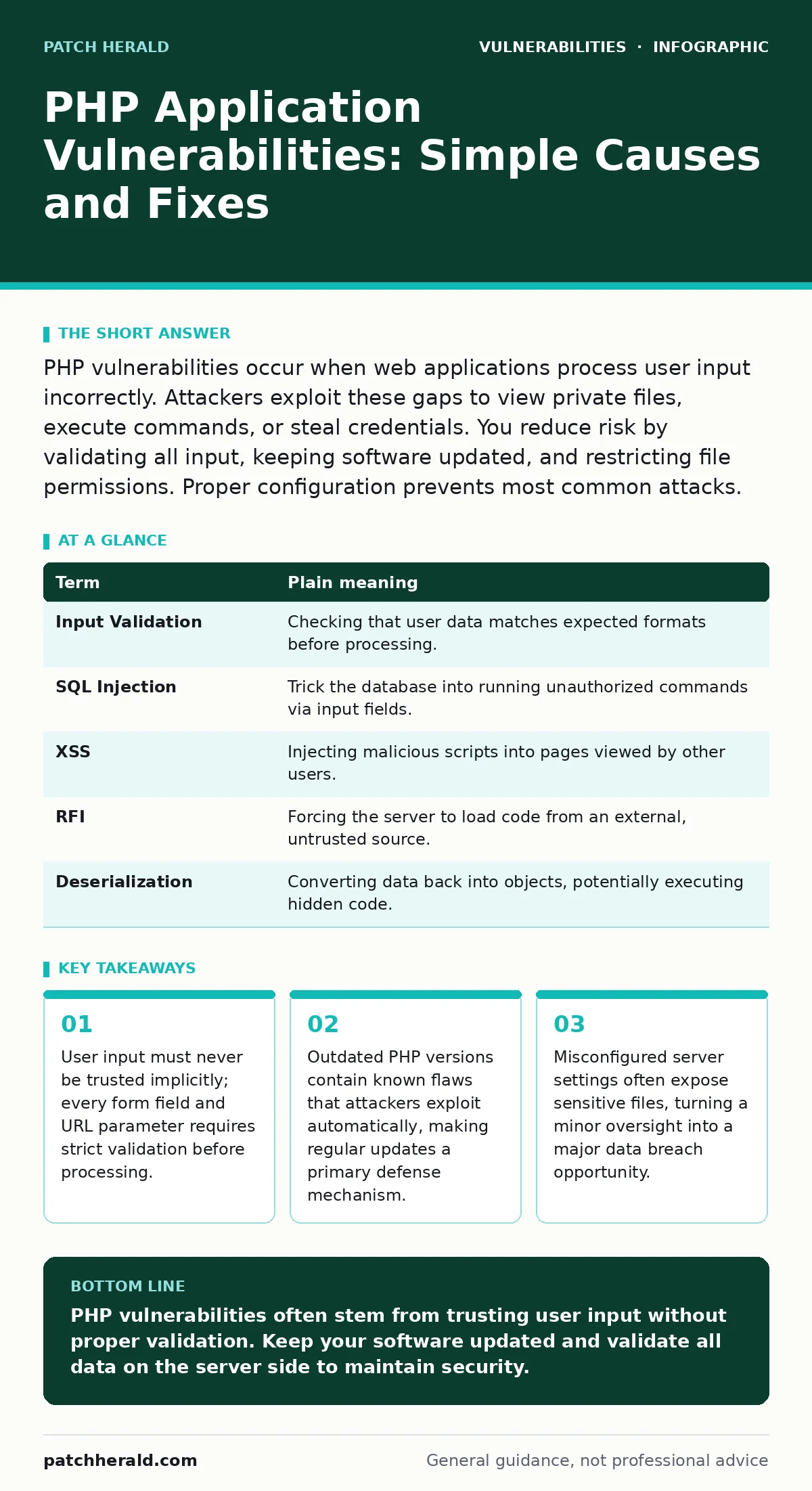
PHP vulnerabilities occur when web applications process user input incorrectly. Attackers exploit these gaps to view private files, execute commands, or steal credentials. You reduce risk by validating all input, keeping software updated, and restricting file permissions. Proper configuration prevents most common attacks.
The Library Metaphor for Code Safety
Imagine a public library where patrons can request any book. The librarian’s job is to check the request slip. If the slip says "History," the librarian hands over a history book. If the slip says "Burn the library," a strict librarian refuses. A vulnerable application is like a librarian who reads "Burn the library" and proceeds to execute that command. This metaphor explains why input validation matters. PHP applications process requests from users. If the code does not distinguish between a harmless request and a malicious command, the system fails. The library analogy carries through every security concept.
Core Terms for Web Security
Understanding the language of web security helps you spot issues early. These terms appear in reports and logs. Knowing them prevents confusion when you hear about new threats.
| Term | Plain meaning |
|---|---|
| Input Validation | Checking that user data matches expected formats before processing. |
| SQL Injection | Trick the database into running unauthorized commands via input fields. |
| XSS | Injecting malicious scripts into pages viewed by other users. |
| RFI | Forcing the server to load code from an external, untrusted source. |
| Deserialization | Converting data back into objects, potentially executing hidden code. |
How Input Validation Fails
Most PHP vulnerabilities start with bad input handling. Developers often assume users enter only text where text is expected. Attackers enter code. This is called injection. The application treats the code as data. It executes it. The result is unauthorized access. This happens because PHP is a server-side scripting language. It runs on the server before sending HTML to your browser. If the server trusts the input, it runs the attacker’s script. This is the core failure mode.
The Cost of Outdated Software
Running old PHP versions creates immediate risk. Developers fix known flaws in new releases. Attackers scan the internet for servers running old versions. They exploit these known flaws automatically. This is why keeping software current matters. You do not need to understand the code to know it is unsafe. The version number tells you enough. Older versions lack modern security features. They also lack patches for discovered weaknesses. This exposes your site to automated attacks.
Consider related risks in your infrastructure. See our guide on out-of-band patches for how vendors handle critical fixes outside normal schedules. Also review vulnerabilities in VPN appliances to ensure your remote access tools are not the weak link.
Hidden Risks in Configuration
Code is not the only source of danger. Server configuration plays a huge role. Misconfigured settings can expose sensitive files. Attackers look for default files or backup copies. They also look for exposed admin panels. If you leave default login pages accessible, attackers will try to break in. Restricting access to administrative areas reduces the attack surface. This is a simple but often overlooked step.
Check your setup against common mistakes. Our guide on exposed admin panels details how to hide or protect these entry points. Additionally, review WordPress plugin vulnerabilities if you use that platform, as plugins often introduce their own risks.
See also: What Is Website Security: Cyber Security Fundamentals for Web Protection · Prototype Pollution Risks and Protection for Small Businesses
Practical Safety Habits
You can improve your site’s security with three simple steps. These actions address the most common entry points. They do not require deep coding knowledge. They require discipline and consistency.
- Update regularly: Install PHP updates and application patches as soon as they are available. Delaying updates leaves known doors open.
- Validate input: Ensure all forms check data before processing. Reject anything that does not match strict patterns.
- Restrict permissions: Limit who can read or write files on the server. This contains damage if a breach occurs.
Understanding Attack Complexity
Some attacks are complex. They exploit subtle timing differences or memory usage. These are known as side-channel attacks. They do not break the code directly. They infer secrets from how the system behaves. While rare for small sites, they show that security is layered. Another risk is sandbox escape vulnerabilities, where code breaks out of its restricted environment. Understanding these helps you appreciate why simple fixes are not enough. You need a defense-in-depth approach.
The Role of Standards
Security standards help measure risk. The CVSS 4.0 framework provides a common language for severity. It helps you prioritize fixes. High scores mean immediate action. Low scores allow for scheduled maintenance. Using a standard framework ensures you address the most dangerous issues first. It also helps you communicate risk to stakeholders. This clarity prevents panic and promotes rational decision-making.
Final Checks for Resilience
Security is an ongoing process. It is not a one-time setup. Regular audits find new weaknesses. Monitoring logs detects unusual activity. Backups ensure recovery if things go wrong. These habits build resilience. They protect your data and your reputation. Remember the library metaphor. Always check the request slip. Never assume the patron is telling the truth. This mindset protects your PHP applications.
Key takeaways
- User input must never be trusted implicitly; every form field and URL parameter requires strict validation before processing.
- Outdated PHP versions contain known flaws that attackers exploit automatically, making regular updates a primary defense mechanism.
- Misconfigured server settings often expose sensitive files, turning a minor oversight into a major data breach opportunity.
PHP vulnerabilities often stem from trusting user input without proper validation. Keep your software updated and validate all data on the server side to maintain security.
Frequently asked questions
How do I know if my PHP site is vulnerable?
Use automated scanning tools to check for known issues. Review error logs for unusual patterns. Regular audits reveal hidden weaknesses.
Can I fix vulnerabilities without hiring a developer?
Yes, by updating software and configuring security settings correctly. Many fixes involve changing configuration files or applying patches.
What is the most common PHP vulnerability?
SQL injection is very common. It occurs when user input is inserted directly into database queries without sanitization.
Do I need a firewall for PHP applications?
A web application firewall helps block common attacks. It adds a layer of protection but does not replace proper coding practices.
How this guide was produced: written by the Patch Herald editorial team with AI assistance, checked against the public references listed below, and reviewed when the facts change. See our editorial policy or report an error.