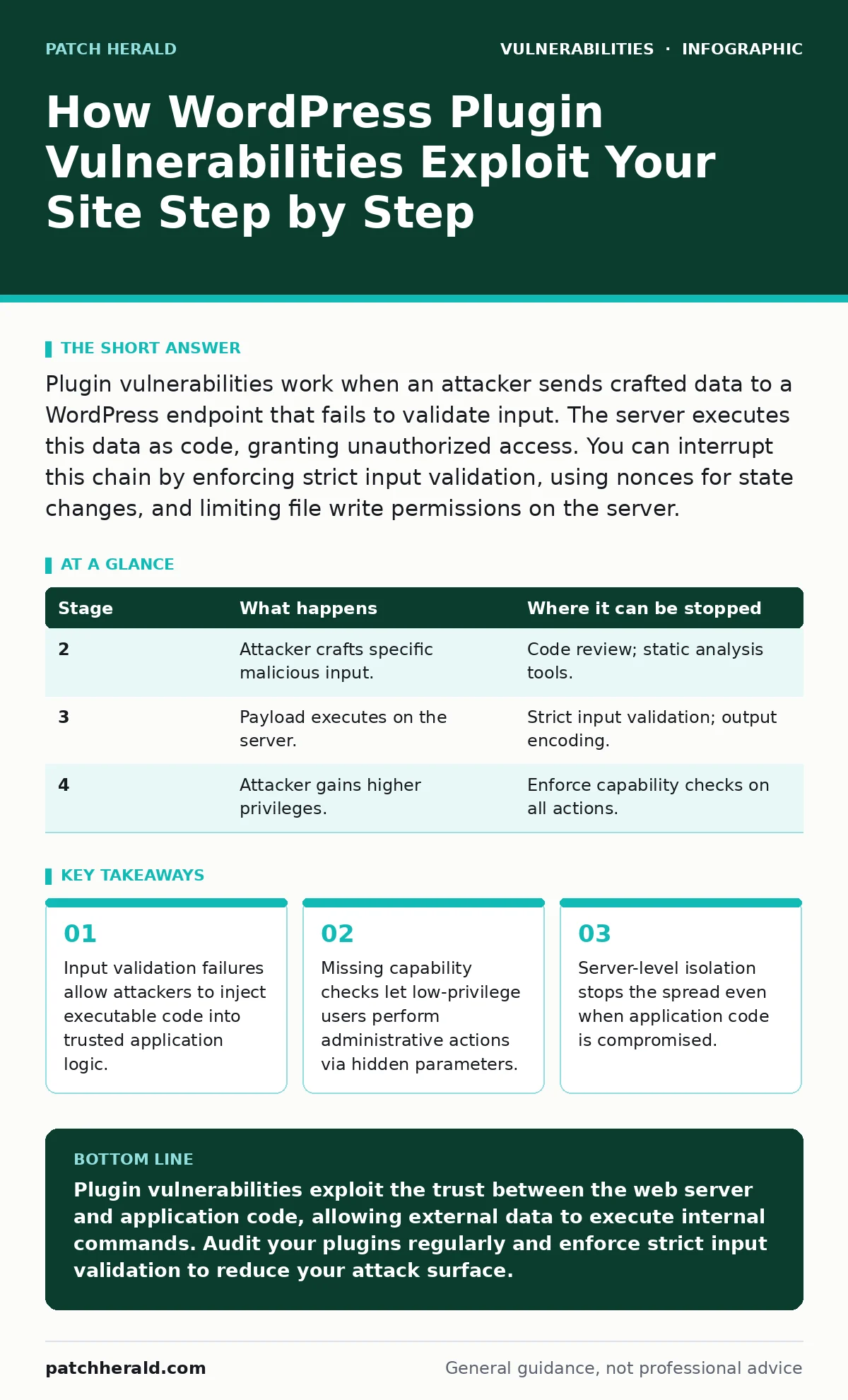
Plugin vulnerabilities work when an attacker sends crafted data to a WordPress endpoint that fails to validate input. The server executes this data as code, granting unauthorized access. You can interrupt this chain by enforcing strict input validation, using nonces for state changes, and limiting file write permissions on the server.
Understanding the Attack Surface
WordPress extends its core functionality through plugins, which add features like contact forms or e-commerce capabilities. Each plugin introduces new code paths that the web server must process. These paths often handle user input, file uploads, or database queries. When a plugin processes this input without strict validation, it creates a vulnerability. The server treats the plugin’s code as trusted because it resides within the WordPress directory structure. This trust is the primary mechanism attackers exploit. They do not need to break into the server directly. They only need to find a plugin that accepts their malicious data and executes it.
The attack surface expands with every plugin installed. A single vulnerable plugin can expose the entire site. The complexity of modern plugins means they interact with multiple systems, including databases, file systems, and external APIs. Each interaction point represents a potential failure mode. You must understand that the vulnerability lies not in the idea of the plugin, but in its implementation of security controls. Poor implementation allows an attacker to manipulate the flow of data and control the server’s behavior.
Stage 1: Reconnaissance and Discovery
The attacker begins by identifying the target WordPress installation. They scan for known plugin versions using public databases or directory listings. Many plugins reveal their version numbers in HTML comments, JavaScript files, or REST API endpoints. This information is critical because it tells the attacker which specific vulnerabilities apply. They look for plugins that are outdated or have known flaws. The attacker does not guess randomly. They use automated tools to map the site’s structure and identify active plugins.
This stage relies on information disclosure. If your site hides version numbers, the attacker must perform more aggressive scanning. They might probe for common plugin paths or analyze HTTP headers. The goal is to confirm the presence of a vulnerable component. You can interrupt this stage by removing unnecessary plugins and ensuring version information is not exposed in public-facing files. Minimizing the number of plugins reduces the number of potential entry points.
Stage 2: Payload Construction
Once a vulnerability is identified, the attacker crafts a specific input designed to exploit it. This input is called a payload. For a SQL injection flaw, the payload might be a string that alters a database query. For a cross-site scripting issue, it might be a script tag. The payload must bypass any existing filters. The attacker studies the plugin’s code to understand how it handles data. They look for functions that pass user input directly to sensitive operations.
The construction phase requires precision. The payload must be syntactically correct for the target environment. If the plugin uses a specific database driver, the payload must match its syntax. The attacker tests the payload in a controlled environment first. They ensure it works before sending it to the live site. This stage is purely intellectual. No traffic is sent to the target yet. The attacker is preparing the weapon.
Stage 3: Delivery and Execution
The attacker sends the payload to the vulnerable endpoint. This might be a contact form, a search field, or a REST API route. The request looks like normal user activity. The web server receives it and passes it to the WordPress application. The plugin processes the input. If the plugin fails to sanitize the data, the payload executes. For example, if the plugin inserts the input into a database query without escaping it, the database executes the attacker’s code.
This is the critical moment. The server executes the malicious code as if it were legitimate. The attacker gains a foothold. They might read sensitive data, modify records, or execute commands on the server. The success of this stage depends entirely on the lack of input validation. Input validation is the process of checking that data meets expected criteria before processing. Without it, the application trusts all input.
Stage 4: Privilege Escalation
Initial access often provides limited rights. The attacker may only be able to read data or modify their own profile. They seek to elevate their privileges. They look for functions that perform administrative tasks but lack proper capability checks. A capability check verifies that the current user has permission to perform an action. If a plugin allows a subscriber to delete posts, it has a privilege escalation flaw.
The attacker uses the initial foothold to trigger these unchecked functions. They might modify hidden form fields or send requests with forged tokens. This stage exploits the assumption that only administrators will access certain endpoints. By bypassing these checks, the attacker gains full control. They can install new plugins, create administrator accounts, or modify core files.
| Stage | What happens | Where it can be stopped |
|---|---|---|
| 2 | Attacker crafts specific malicious input. | Code review; static analysis tools. |
| 3 | Payload executes on the server. | Strict input validation; output encoding. |
| 4 | Attacker gains higher privileges. | Enforce capability checks on all actions. |
Stage 5: Persistence and Data Exfiltration
With administrative access, the attacker ensures they can return. They create a backdoor plugin or modify existing files. They might add a new administrator account with a known password. This step ensures persistence. Even if you patch the original vulnerability, the attacker retains access. They then begin exfiltrating data. They download the database, user credentials, and private files.
The attacker operates silently to avoid detection. They may use encrypted channels to send data out. This stage highlights the danger of server-side template injection if the plugin uses template engines. The attacker can render arbitrary code, further expanding their control. You can interrupt this by monitoring file integrity. Any unexpected changes to core or plugin files should trigger an alert.
Interrupting the Attack Chain
You can stop this process at multiple points. The most effective method is defense in depth. This means using multiple layers of security. If one layer fails, another catches the threat. Input validation is the first line of defense. It ensures that only expected data enters the system. Output encoding prevents stored data from being executed as code.
Capability checks are equally important. They ensure that users can only perform actions they are authorized to do. Even if an attacker bypasses input validation, they cannot perform administrative tasks without proper permissions. You should also limit file write permissions. If the web server cannot write to the plugin directory, an attacker cannot install a backdoor.
The Hidden Cost of Convenience
Many small business owners install plugins for convenience. They want quick solutions for complex problems. This convenience comes with a hidden cost: increased maintenance burden. Each plugin is a third-party codebase that you must trust. You are responsible for keeping it updated. If the developer abandons the project, you are left with a vulnerable component.
The cost is not just technical. It is operational. You must monitor for updates, test for compatibility, and review permissions. This requires time and expertise. If you lack this expertise, you are vulnerable. The secure software development lifecycle emphasizes testing and validation at every stage. Most plugin developers do not follow this rigorously. You must assume that every plugin has flaws.
Mitigation Strategies
Mitigation requires a proactive approach. Start by auditing your current plugins. Remove any that are not essential. Keep the remaining plugins updated. Enable automatic updates where possible. Use a web application firewall to filter malicious requests. This adds a layer of protection before traffic reaches your application.
Monitor your server logs for unusual activity. Look for failed login attempts, strange file modifications, or unexpected database queries. Implement regular backups. If an attack succeeds, you can restore your site to a previous state. This does not prevent the attack, but it limits the damage. You should also restrict access to the administration area. Use strong passwords and two-factor authentication.
Long-Term Security Posture
Security is not a one-time task. It is an ongoing process. You must stay informed about new vulnerabilities. Subscribe to security newsletters and follow industry standards. Understand the CWE weakness categories to recognize common flaw types. This knowledge helps you identify risks before they are exploited.
Regularly review your site’s architecture. Ask why each plugin is installed. Can its function be achieved with core features or a more secure alternative? Reduce your attack surface by minimizing dependencies. The fewer plugins you use, the fewer vulnerabilities you have to manage. This reduces the complexity of your security posture.
You should also consider the impact of dependency confusion attacks. Plugins often rely on external libraries. If these libraries are compromised, your site is at risk. Ensure that your plugins use trusted sources for their dependencies. This adds another layer of verification to your supply chain.
Key takeaways
- Input validation failures allow attackers to inject executable code into trusted application logic.
- Missing capability checks let low-privilege users perform administrative actions via hidden parameters.
- Server-level isolation stops the spread even when application code is compromised.
Plugin vulnerabilities exploit the trust between the web server and application code, allowing external data to execute internal commands. Audit your plugins regularly and enforce strict input validation to reduce your attack surface.
Frequently asked questions
Does updating WordPress core fix plugin vulnerabilities?
No. WordPress core updates address flaws in the main software. Plugin vulnerabilities are specific to the plugin code. You must update each plugin individually to patch its specific flaws.
Can a security plugin prevent all plugin vulnerabilities?
No. Security plugins can block common attacks and monitor for changes. They cannot fix flawed code within other plugins. If a plugin has a logic error, a security plugin may not detect or prevent its exploitation.
How do I know if a plugin is vulnerable?
Check the plugin’s changelog for security fixes. Monitor security advisories from reputable sources. Use vulnerability scanners that check for known flaws in installed versions. Regular audits help identify outdated or risky components.
Is it safe to use free plugins?
Free plugins can be secure if they are well-maintained and follow best practices. The price does not determine security. Look for active development, positive reviews, and regular updates. Avoid plugins that have not been updated in a long time.
How this guide was produced: written by the Patch Herald editorial team with AI assistance, checked against the public references listed below, and reviewed when the facts change. See our editorial policy or report an error.