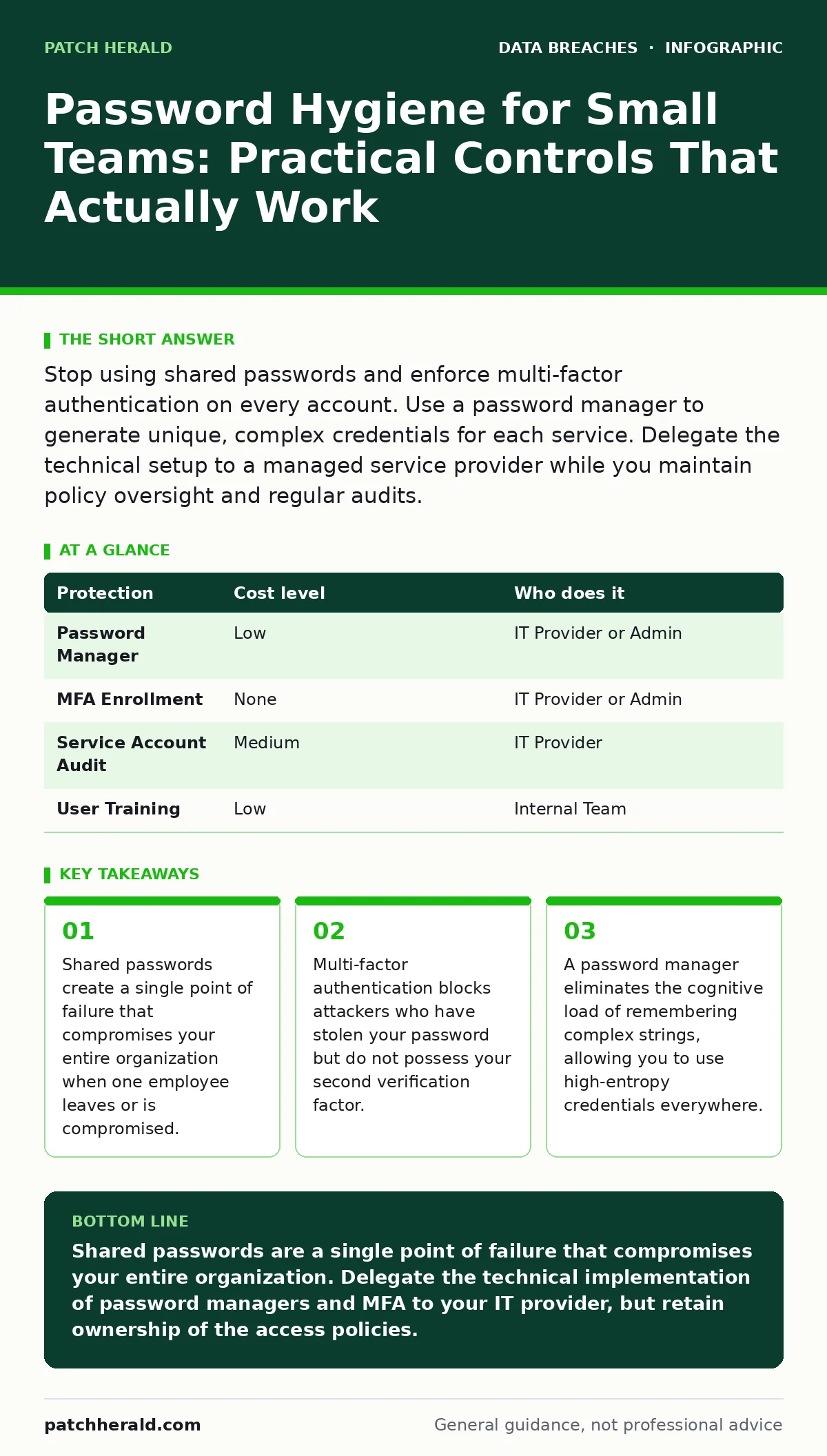
Stop using shared passwords and enforce multi-factor authentication on every account. Use a password manager to generate unique, complex credentials for each service. Delegate the technical setup to a managed service provider while you maintain policy oversight and regular audits.
The Hidden Cost of Shared Credentials
Small organizations often treat passwords as a shared resource to save time. This practice introduces a specific vulnerability known as lateral movement. When one person’s device is compromised, the attacker inherits access to every service that uses that shared credential. You cannot revoke access for a single person without locking out the entire team.
This creates an operational bottleneck. When an employee leaves, you must change the password for every service they accessed. If you miss one, the former employee retains access. This delay between termination and credential rotation is a common window for data exfiltration.
Shared passwords also prevent you from knowing who performed an action. If a file is deleted or a transaction is reversed, the logs show the shared account. You cannot distinguish between a mistake by a trusted employee and malicious activity by an attacker. This ambiguity complicates your data breach response plans because you cannot accurately determine the scope of unauthorized access.
Why Complexity Alone Fails
Many organizations believe that forcing users to create long, complex passwords is sufficient protection. This approach ignores the human tendency to reuse credentials. When you force a user to remember five complex passwords, they will likely write them down or use a simple variation of one base password.
Attackers do not guess passwords; they steal them. Credential stuffing attacks use lists of usernames and passwords obtained from other breaches. If you use the same password for your personal email and your business banking, a breach at a unrelated website compromises your business accounts.
The solution is not better memory; it is better tools. You need a system that generates and stores unique, high-entropy passwords for every service. High entropy means the password is random and unpredictable, making it mathematically infeasible to guess. This requires a password manager that encrypts your vault locally on your device.
Implementing Multi-Factor Authentication
Multi-factor authentication (MFA) adds a second layer of verification beyond your password. Even if an attacker steals your password, they cannot log in without the second factor. This could be a code from an authenticator app, a hardware security key, or a biometric scan.
SMS-based MFA is convenient but vulnerable to SIM swapping attacks, where an attacker tricks your mobile carrier into transferring your phone number to their device. Authenticator apps or hardware keys are more secure because they do not rely on the cellular network.
You should enable MFA on every service that supports it, starting with email and cloud storage. Email is the primary target for attackers because it allows them to reset passwords for other services. If you secure your email, you significantly raise the barrier for account takeover fraud.
| Protection | Cost level | Who does it |
|---|---|---|
| Password Manager | Low | IT Provider or Admin |
| MFA Enrollment | None | IT Provider or Admin |
| Service Account Audit | Medium | IT Provider |
| User Training | Low | Internal Team |
Delegating Technical Enforcement
You do not need to be a security expert to enforce password hygiene, but you do need to delegate the technical implementation correctly. Many small businesses hire IT providers for break-fix support but fail to mandate security configurations.
Your IT provider should configure your identity management system to enforce password policies. This includes setting minimum length requirements, banning commonly used passwords, and automatically enrolling users in MFA. They should also configure your role-based access control to ensure employees only have access to the data they need to do their jobs.
Do not delegate policy decisions. You must define who gets access to what and how quickly access is revoked when someone leaves. The IT provider executes your policy; you own the risk. If your provider suggests disabling MFA for "ease of use," you must refuse. Convenience should never override security.
Questions for Your IT Provider
Before signing a contract or renewing one, ask these specific questions to ensure they prioritize hygiene:
- How do you manage passwords for service accounts and administrative tools?
- What is your process for disabling accounts within 24 hours of employee termination?
- Do you enforce MFA for all administrative access to your infrastructure?
- How often do you audit user permissions to remove unnecessary access?
- Can you provide a report on failed login attempts that might indicate brute-force attacks?
These questions reveal whether your provider treats security as an afterthought or a core function. If they hesitate or give vague answers, consider finding a provider who specializes in security-aware managed services.
See also: Federated Identity: Definition, Purpose and How It Works · Can I have two mobile device management solutions?
Integrating with Broader Security Practices
Password hygiene is one piece of a larger puzzle. It works best when combined with other controls. For example, full disk encryption protects your data if a laptop is stolen, but it does not stop an attacker who has your passwords from logging in remotely.
You must also monitor for misconfigured cloud storage leaks, which often occur when employees share access to sensitive files using weak or shared credentials. Regular audits of your cloud storage permissions can reveal these gaps before an attacker exploits them.
Furthermore, keep in mind that log retention is critical for investigating incidents. If you do not store logs of who logged in and when, you cannot prove whether a breach occurred or how it happened. Ensure your IT provider retains logs for a sufficient period to support forensic analysis.
Maintaining the Discipline
Implementing these controls is only the beginning. You must maintain them through regular reviews and updates. Technology changes, and so do attack methods. What was secure last year may be vulnerable today.
Conduct quarterly reviews of your user access lists. Remove accounts for former employees and contractors. Update passwords for any services that do not support automatic rotation. Train your team on the importance of not sharing credentials and reporting suspicious activity.
Remember that accidental data disclosure is often caused by poor password hygiene. When employees share screens or leave devices unlocked, they expose shared credentials. Reinforce the culture of security by making it easy for the right behavior and hard for the wrong behavior.
Key takeaways
- Shared passwords create a single point of failure that compromises your entire organization when one employee leaves or is compromised.
- Multi-factor authentication blocks attackers who have stolen your password but do not possess your second verification factor.
- A password manager eliminates the cognitive load of remembering complex strings, allowing you to use high-entropy credentials everywhere.
Shared passwords are a single point of failure that compromises your entire organization. Delegate the technical implementation of password managers and MFA to your IT provider, but retain ownership of the access policies.
Frequently asked questions
Is a password manager safe if the company is hacked?
Yes, if the password manager uses strong encryption and you protect the master password with MFA. The attacker would need both your master password and your second factor to access the vault.
How often should we change passwords?
Only when there is evidence of a breach or compromise. Frequent forced rotations lead to weaker passwords and increased reuse. Unique, complex passwords are more important than frequent changes.
What if an employee loses their MFA device?
Your IT provider should have a backup method, such as backup codes or a secondary device, to restore access. Ensure this process is documented and tested regularly.
Can we use SMS for MFA?
SMS is less secure than authenticator apps or hardware keys due to SIM swapping risks. Use it only if no other option is available, and transition to a more secure method as soon as possible.
How this guide was produced: written by the Patch Herald editorial team with AI assistance, checked against the public references listed below, and reviewed when the facts change. See our editorial policy or report an error.