Screen locker ransomware blocks access to your desktop without encrypting data. It relies on psychological pressure and technical tricks like USB blocking. You can often recover access by booting from external media or using safe mode, avoiding the ransom entirely.
Myth: The Files Are Permanently Encrypted and Unrecoverable
Reality: Screen locker ransomware does not encrypt your data. It changes the operating system’s display settings to block the user interface. Your documents, databases, and images remain on the disk in their original format. The malware simply prevents you from seeing them or interacting with the system.
This distinction matters because encryption requires significant processing power and time. Screen lockers prioritize speed to catch users before they react. They replace the login screen with a full-screen warning. This warning claims your data is gone. In truth, the data sits quietly on the hard drive, waiting for the lock to be removed.
Imagine a burglar who changes the combination on your office door but does not touch the files inside. You cannot enter the room, but the contents are safe. This is how screen lockers operate. They create a barrier to entry, not a barrier to data integrity.
Myth: You Must Pay to Get Your Computer Back
Reality: Paying the ransom rarely restores access. Attackers often remove the decryption key from their servers after payment. They may also provide a broken tool that fails to unlock the screen. Once you pay, you have no leverage. The attacker has no incentive to help you further.
The business model relies on fear, not technical superiority. Attackers know many victims will pay out of panic. They design the lock screen to look official and threatening. They use countdown timers and legalistic language to induce stress. This pressure overrides rational decision-making.
If you pay, you fund further attacks. You also mark your organization as a willing payer. This makes you a target for repeat incidents. The financial loss extends beyond the immediate ransom. It includes the cost of cleaning the system and the risk of future extortion.
Myth: Rebooting the Computer Fixes the Problem
Reality: A standard reboot often fails to bypass the lock. The malware installs itself as a persistent service or modifies boot parameters. It ensures it loads before the normal operating system interface. A simple restart just brings you back to the same locked screen.
However, rebooting into a different mode can work. Safe Mode loads only essential drivers and services. Many screen lockers do not integrate deeply enough to survive this stripped-down environment. If you can access Safe Mode, you may regain control. This requires quick action before the malware fully embeds itself.
Suppose the malware has hooked into the display driver. A normal reboot reloads that driver, reactivating the lock. Safe Mode uses a generic display driver instead. This bypasses the hook. You can then use built-in tools to remove the malicious files. This method works only if the malware is not deeply rooted in the firmware.
Myth: The USB Ports Are Disconnected by Hardware
Reality: The malware disables USB ports through software, not hardware. It sends commands to the operating system to ignore input from external devices. This prevents you from plugging in a keyboard to type commands or a drive to copy data. The physical ports still function electrically.
This software block is fragile. It relies on the operating system obeying the malware’s instructions. If you boot from a different source, the malware’s instructions are ignored. A bootable USB drive or network boot image runs outside the infected operating system. It does not load the malicious drivers.
This is why external media is your best defense. You can create a recovery drive on a clean machine. This drive contains tools to scan and repair the infected system. It allows you to access files even when the main screen is locked. The malware cannot block what it cannot see.
Myth: Remote Wiping Is the Only Solution
Reality: Remote wiping destroys all data on the device. This is a drastic measure that should be a last resort. It is often unnecessary for screen lockers. Since the files are not encrypted, they can usually be recovered. Wiping the drive loses everything, including the ransomware itself.
A better approach is to isolate the device. Disconnect it from the network to prevent lateral movement. Then, use external tools to image the drive. This creates a copy of the data. You can then wipe and reinstall the operating system on the original device. Finally, restore the data from the image.
This process preserves your information. It eliminates the malware completely. It also provides a forensic copy for analysis. Wiping immediately skips the recovery step. It assumes the data is lost. This assumption is incorrect for screen lockers. It is correct for full disk encryption ransomware, but not for lockers.
See also: Removing Malware From a Mac: Benefits, Limits, and Recovery Realities · Software Restriction Policies: 8 Practices to Stop Execution
Myth: Antivirus Software Always Detects and Removes It
Reality: Traditional antivirus may miss screen lockers. These programs often use legitimate system tools to achieve their goals. They modify registry keys and display settings, which are normal administrative actions. Antivirus signatures may not recognize these behaviors as malicious.
Behavioral detection is more effective. It looks for unusual patterns, such as a sudden change in the display driver. Endpoint detection and response tools can identify these anomalies. They can block the malware before it locks the screen. This requires proactive monitoring, not just passive scanning.
See our guide on Microsoft Defender Antivirus for details on configuring behavioral monitoring. Standard scans look for known bad files. Screen lockers may not have a known signature yet. They rely on stealth and speed. Detection depends on recognizing the intent, not just the code.
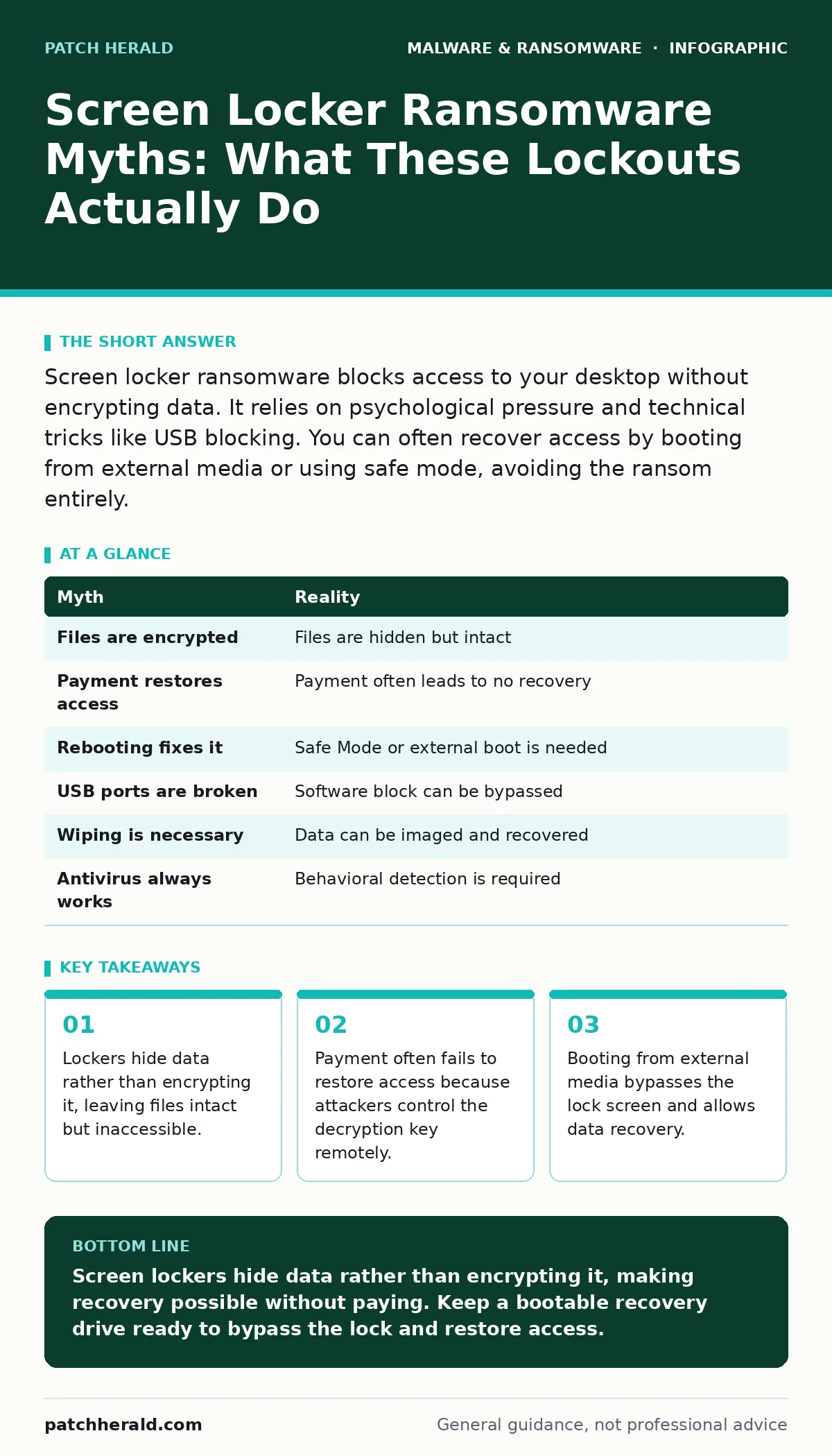
| Myth | Reality |
|---|---|
| Files are encrypted | Files are hidden but intact |
| Payment restores access | Payment often leads to no recovery |
| Rebooting fixes it | Safe Mode or external boot is needed |
| USB ports are broken | Software block can be bypassed |
| Wiping is necessary | Data can be imaged and recovered |
| Antivirus always works | Behavioral detection is required |
Summary of Recovery Options
Reality: Recovery depends on the depth of the infection. Surface-level lockers can be bypassed with Safe Mode. Deeper infections require external boot media. In all cases, the data is likely still present. The goal is to regain control of the operating system interface.
Do not assume the worst. Screen lockers are designed to scare you into paying. They are not designed to destroy your data. Understanding this difference changes your response. You shift from panic to procedure. You use technical controls to bypass the psychological trap.
Review your disaster recovery plans to include screen locker scenarios. Ensure your team knows how to boot from external media. Train them to recognize the difference between lockers and encryptors. This knowledge saves time and data during an incident.
Key takeaways
- Lockers hide data rather than encrypting it, leaving files intact but inaccessible.
- Payment often fails to restore access because attackers control the decryption key remotely.
- Booting from external media bypasses the lock screen and allows data recovery.
Screen lockers hide data rather than encrypting it, making recovery possible without paying. Keep a bootable recovery drive ready to bypass the lock and restore access.
Frequently asked questions
Can I remove screen locker ransomware without reinstalling Windows?
Yes, if you can boot into Safe Mode or use external recovery tools. You can delete the malicious files and restore system settings.
Does screen locker ransomware affect networked computers?
It can spread if it uses network vulnerabilities. Isolate the infected device immediately to prevent lateral movement.
How do I know if I have a screen locker or full encryption?
Check if files have changed extensions or become unreadable. If files are normal but the screen is locked, it is a locker.
Is browser isolation effective against screen lockers?
Browser isolation prevents initial infection from web sources. It reduces the risk of downloading the locker in the first place.
How this guide was produced: written by the Patch Herald editorial team with AI assistance, checked against the public references listed below, and reviewed when the facts change. See our editorial policy or report an error.