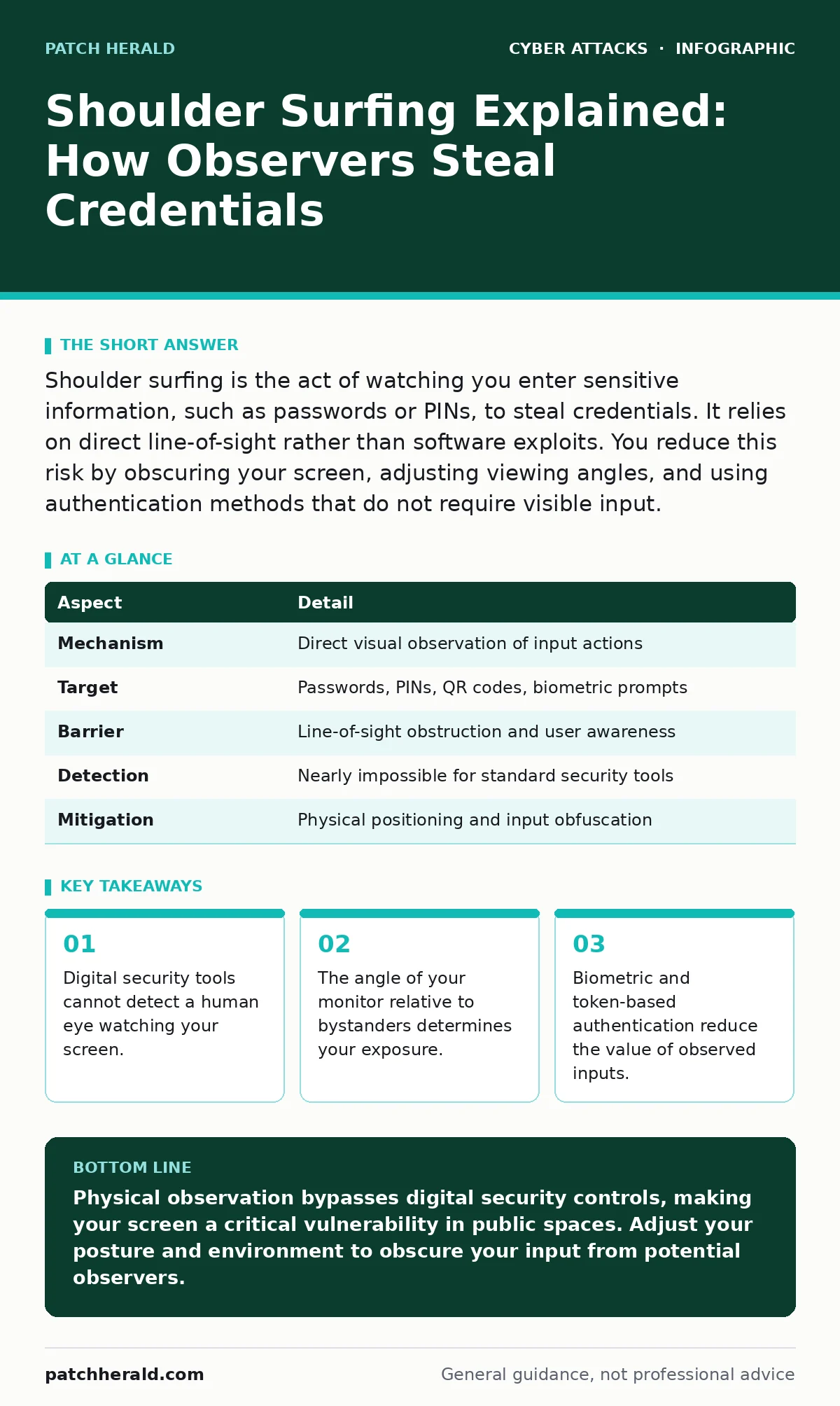
Shoulder surfing is the act of watching you enter sensitive information, such as passwords or PINs, to steal credentials. It relies on direct line-of-sight rather than software exploits. You reduce this risk by obscuring your screen, adjusting viewing angles, and using authentication methods that do not require visible input.
The Glass Wall of Authentication
Imagine holding a secret code on a sticky note. You can lock the note in a safe, but if you write it down in a public park, the safe is irrelevant. Digital security often suffers from this same blind spot. You may employ endpoint protection software to block malware and firewalls to filter network traffic, yet these tools are useless against a person standing three feet away.
Shoulder surfing is the practice of observing a user to capture sensitive data as it is entered. It is a physical intrusion technique that requires no technical skill, no malware, and no network access. The attacker simply needs a clear view of your screen or keypad. This method remains effective because it targets the human interface, which is rarely shielded by the same rigorous controls applied to server infrastructure.
Anatomy of the Observation
The mechanics of shoulder surfing rely on basic geometry and human behavior. An attacker positions themselves within your peripheral vision or directly behind you. They wait for you to type a password, enter a PIN, or scan a QR code. Once the input is complete, they memorize or photograph the data.
The success of this attack depends on two factors: visibility and duration. If your screen is bright and reflective, the data is easier to read from a distance. If you type slowly or hesitate, the attacker has more time to process the information. Many users assume that typing quickly prevents observation, but this is a misconception. High-speed cameras on smartphones can capture keystrokes even when typed rapidly.
| Aspect | Detail |
|---|---|
| Mechanism | Direct visual observation of input actions |
| Target | Passwords, PINs, QR codes, biometric prompts |
| Barrier | Line-of-sight obstruction and user awareness |
| Detection | Nearly impossible for standard security tools |
| Mitigation | Physical positioning and input obfuscation |
Common Forms and Variations
Shoulder surfing extends beyond simple password watching. In crowded spaces like coffee shops or transit hubs, attackers may use small mirrors or reflective surfaces to view screens from awkward angles. This allows them to remain outside your direct field of view while maintaining a clear sightline to your monitor.
Another variation involves recording the session. An attacker might use a smartphone camera to film your screen from across the room. They can then review the footage later in a secure location to decipher the input. This removes the pressure of memorizing complex strings in real-time.
QR code scanning is a modern vector for this threat. When you scan a code to authenticate or pay, the screen often displays confirmation details or temporary tokens. An observer can capture this transient data before it disappears. This is particularly dangerous when combined with OAuth consent phishing, where a user might be tricked into authorizing access based on observed but misunderstood prompts.
Who Is Most Exposed
You are at higher risk when you combine sensitive actions with public environments. Logging into financial accounts, accessing corporate email, or entering multi-factor authentication codes in a lobby increases your exposure. The belief that these actions are private is the primary vulnerability.
Employees who travel frequently are prime targets. Airports and hotel lobbies are designed for high foot traffic, providing ample opportunity for observers to blend in. Business owners who check emails on tablets in waiting rooms expose their credentials to anyone passing by.
The risk is not limited to high-value targets. Attackers often cast a wide net, collecting credentials from multiple victims to find accounts with weak secondary protections. Even if your password is strong, if it is observed, it becomes compromised. This makes cyber hygiene practices like regular password changes less effective if the root cause is physical observation.
The Hidden Cost of Convenience
Many users prioritize convenience over privacy, leading to poor positioning choices. Sitting with your back to a wall or facing a window can inadvertently expose your screen to passersby. The layout of open-plan offices often forces employees to work with their screens visible to colleagues and visitors.
There is also a psychological component. People tend to lower their guard when they feel safe in a familiar environment. A coworker asking for help with a technical issue might glance at your screen and inadvertently, or intentionally, capture your login details. This social engineering aspect makes shoulder surfing difficult to defend against with technology alone.
Furthermore, the reliance on zero trust security models assumes that digital boundaries are the primary defense. While zero trust verifies every request, it cannot verify that the person making the request is not being watched. Physical security gaps undermine digital trust frameworks.
See also: Drive-By Downloads Explained: Mechanics, Risks, and Silent Prevention · Malicious Bot Traffic: What It Is and How to Stop It
What People Usually Get Wrong
A common misconception is that shoulder surfing only applies to passwords. In reality, any visual input is vulnerable. This includes two-factor authentication codes, security questions, and even the selection of icons on a touchscreen. If an attacker can see what you select, they can replicate your authentication flow.
Another error is assuming that privacy screens are a complete solution. Privacy filters reduce the viewing angle, but they do not eliminate it. If an attacker stands directly in front of you, the filter offers no protection. Additionally, some filters degrade screen quality, causing users to increase brightness, which can make the content more visible from certain angles.
Users also often neglect the risk of reflection. A dark monitor can reflect your screen into a nearby window or polished surface. This indirect line of sight can be captured by an observer who is not even looking directly at your device.
Reducing the Risk Effectively
The most effective defense is physical awareness. Before entering sensitive data, scan your surroundings. Identify who is within arm's reach and who is within line-of-sight. If the environment feels crowded, delay the action until you are in a more private space.
Use your body to shield your input. Position your arm or hand to block the view of your screen or keypad. On a smartphone, cup your hand around the screen. On a laptop, angle the screen away from passersby. These simple physical barriers disrupt the attacker's line of sight.
Consider alternative authentication methods that do not rely on visible input. Biometric attacks are a concern, but fingerprint and facial recognition do not require you to type a sequence that can be watched. Hardware security keys also provide a layer of protection, as the authentication event is physical and does not display a code that can be observed.
Integrating Physical and Digital Defense
Shoulder surfing highlights the limitation of purely digital security strategies. No amount of encryption protects data once it is visible to an unauthorized eye. You must treat physical access as a critical security boundary.
Combine your awareness with technical controls. Use vishing awareness to recognize that attackers may use observed data to impersonate you over the phone. If you suspect your credentials have been watched, change them immediately and enable additional verification steps.
Remember that typosquatting and other digital threats often work in tandem with physical breaches. An attacker with your password can bypass many digital warnings. By securing the physical input stage, you protect the integrity of the entire authentication process.
Key takeaways
- Digital security tools cannot detect a human eye watching your screen.
- The angle of your monitor relative to bystanders determines your exposure.
- Biometric and token-based authentication reduce the value of observed inputs.
Physical observation bypasses digital security controls, making your screen a critical vulnerability in public spaces. Adjust your posture and environment to obscure your input from potential observers.
Frequently asked questions
Can privacy screen filters stop shoulder surfing?
Privacy filters reduce the viewing angle but do not eliminate it. They are most effective against side views but offer little protection if an attacker stands directly in front of you.
Is shoulder surfing a legal offense?
Laws vary by jurisdiction, but unauthorized observation of private data can be considered a violation of privacy or computer fraud statutes. However, enforcement is difficult without clear evidence.
How do I know if someone is shoulder surfing me?
You may notice someone lingering nearby or making eye contact with your screen. Trust your instincts; if someone’s presence feels intrusive, move to a more private location.
Does using a complex password help against shoulder surfing?
Complexity does not prevent observation. A complex password is just as vulnerable to being watched as a simple one. The goal is to obscure the input, not make it harder to read.
How this guide was produced: written by the Patch Herald editorial team with AI assistance, checked against the public references listed below, and reviewed when the facts change. See our editorial policy or report an error.